
Log in here or check for an invite from your provider!
Need to create an account? Talk to your healthcare provider today to ask for their custom sign-up link or check their website for a Fullscript branded sign-up button to create your account.
Follow these steps to place an order on Fullscript:
- Check for an invite or check your email for an invite from your provider. If you don’t have an invite, contact your provider to request access to Fullscript.
- Add products and labs to your cart from your plans, the catalog, order history, or community wellness plans shared by your provider.
- Review your cart and proceed to checkout.
- Enter your shipping address, select a shipping method, and choose a payment method.
- Place your order — we’ll handle the rest!
Mobile users on iOS/Android devices are invited to download the Fullscript app from their device’s app store. Order high-quality supplements and stay on track with refills anytime, anywhere.
Consider setting up Auto refills to schedule flexible, recurring orders, which makes following your plan easier without adding to your to-do list.
Adding products and labs to your cart
Adding supplements to your cart
Adding lab testing to your cart (US-only)
Lab testing ordered by the patient
Lab testing ordered by the practitioner
If your provider covers the cost upfront, they’ll collect payment from you separately. You’ll receive your plan and guided next steps in your Fullscript account, where the order will be marked as Paid by practitioner. In this case, there’s no checkout required through your patient account.
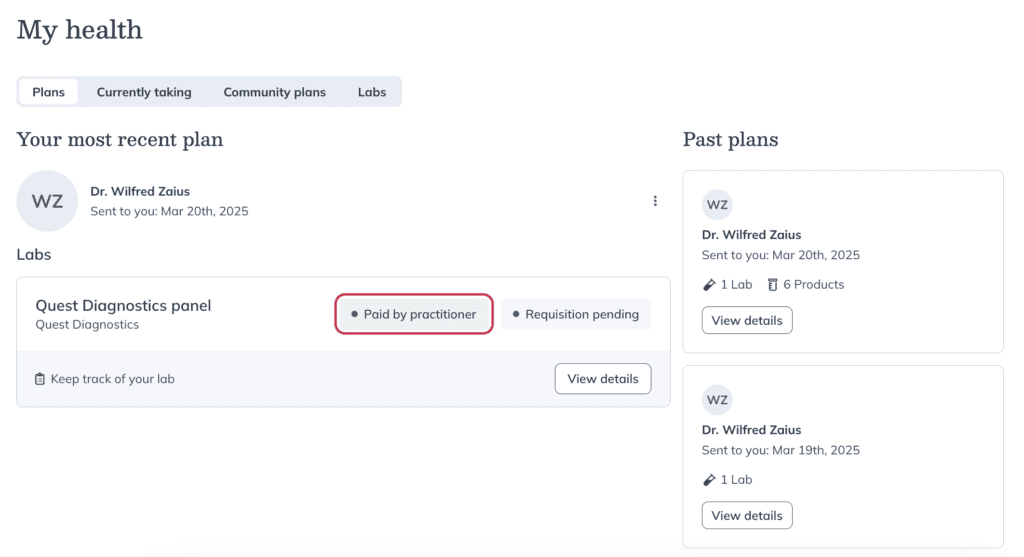
A lab test that’s been paid for by the practitioner.
Reviewing your shopping cart
Entering your shipping address
Choosing your delivery method
See Delivery estimates & shipping options for more shipping-related content, including US and Canadian shipping rates, order cut-off times, shipping to P.O. boxes, and more.
Choosing a payment method
We accept a variety of payment options, including popular credit cards (Visa, Mastercard, Discover, American Express), digital wallet options, HSA/FSA cards, and prepaid credit cards optimized for online purchases. Alternatively, split up the costs of supplements using flexible payment installments, so you don’t have to choose between your wellness and your wallet. If you’re unsure whether your card can be used for online purchases, please contact your financial institution.
Digital wallet payment options
Digital wallet payment options optimized for online purchases, such as Apple Pay and Google Pay, are accepted for patient purchases and displayed in checkout when recognized by your device.
Supported digital wallet options:
Placing your order
Prior to submitting your order request, you’ll see an estimate of the sales tax to be collected on your order; this calculation is provided for your convenience and the actual sales tax amount will be applied when your order is accepted and processed, and depends on various factors including the items purchased, the shipment destination, and the practitioner’s dispensary.
After placing an order
Once your order is placed:
- We’ll email you a confirmation of your order and payment.
- When your order has shipped, we’ll send tracking details so you can follow its journey.
- You can review your order, access tracking info, and download receipts from your Order History in your account.