
Log in to your account!
Select a page from the list below to learn how to use and navigate the platform:
- Plans
- Protocols
- Catalog (if available)
- Auto refill
- Order history
- My account
Fullscript may also include tools that help you and your provider track your health over time, such as wellness check-ins, lab uploads, or connected health data.
Video: Getting started with Fullscript
Personalized plans
Protocols: General wellness support
Catalog: Explore products
Auto refill: Schedule automated orders
Order history: Past orders, receipts, and tracking details
Your shopping cart: Review items and check out
My account: Manage your account details
iOS app: Fullscript notifications
In the Fullscript mobile app, you’ll find a Bell icon ( ) in the upper right-hand corner of most pages.
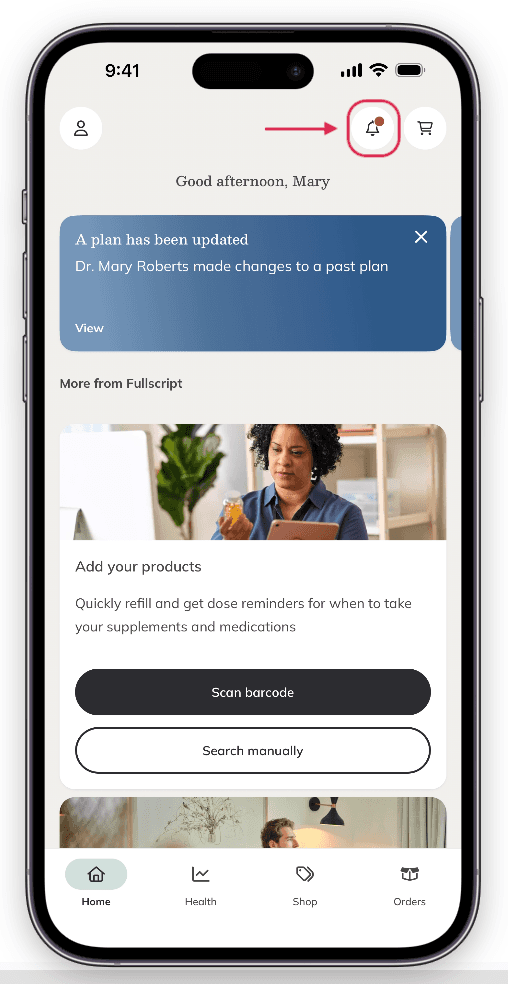
The Notification bell.
Tap the bell ( ) to view your recent notifications from the Fullscript app. A red dot will appear when you have new notifications. Notifications can be related to:
- New plans: When your practitioner has sent you a new plan.
- Plan updates: Your practitioner has made a change to one of your existing plans.
- Refill reminders: It’s time to reorder so you don’t run out!
Dark mode
Signing out: Ending your session
Still need help?
If you need help with your Fullscript account or an order (like signing in, updating your email, tracking a package, or returns), contact Fullscript Support. For questions about a plan, product, lab, or your health, please contact your practitioner directly using the contact details on their website.