
This guide walks you through completing your Diagnostic Solutions requisition form. For other lab requisition guides, see Filling out requisition forms and activating kits.
Each Diagnostic Solutions test may require you to complete different fields on your requisition form. Review the details below to ensure your sample is processed without delay.
Filling out your requisition form
If you’re having a hard time finding your test, use Control + F (Windows) or Command + F (Mac) to search.
All DSL tests require:
- Sample collection date (MM/DD/YYYY)
Some DSL tests also require:
- Whether fasting occurred (for blood or urine)
- Sample type (urine, blood, stool)
Review the table to see which fields you must complete for your particular test:
Test: Required fields
GI-MAP: Date sample collected
CytoDX: Date sample collected
Amino Acids (AAp – Plasma): Date sample collected and fasting status
OMX – Urine/Plasma: Date sample collected and fasting status
IgG or IgE Explorer: Date sample collected
Organic Acids: Date sample collected
Sample requisition form
You only need to fill out the fields marked with a red box. The other sections will come pre-filled.
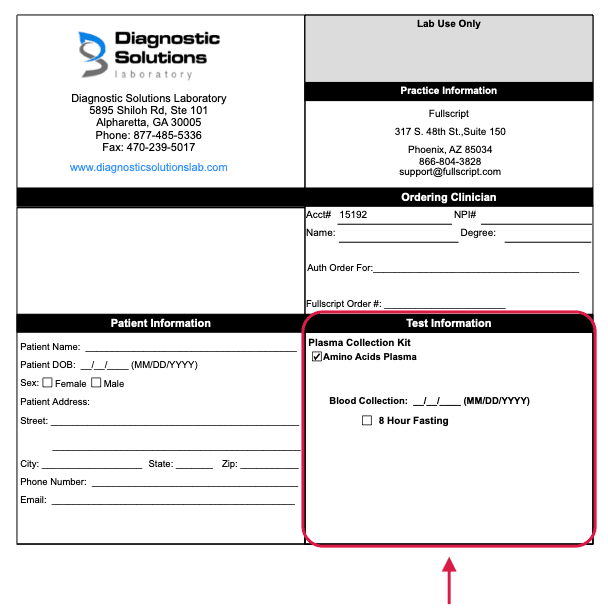
Sample Diagnostic Solutions requisition form.