
We accept a variety of payment options for your convenience. This includes major credit cards and debit cards authorized for online purchases. Orders are paid in full at the time of purchase. Unfortunately, charges can’t be split between multiple payment methods. After a card is used to place an order, it’s saved to your account for future orders but can be removed at any time from your account settings.
We also accept Health Savings (HSA) and Flexible Spending Accounts (FSA) that recognize supplement purchases as eligible expenses. Digital payment options, including Google Pay, can be selected in checkout when recognized from your device.
Refunds are returned to your original method of payment and can’t be transferred to alternate payment methods.
Accepted payment methods
- Credit and debit cards (US/CAN cards only)
- Digital wallet payment options
- Health Savings Accounts (HSA) and Flexible Spending Accounts (FSA)
- Payment installments (Klarna)
- Stripe Link
- Practitioner pay (labs only)
If your provider covers the cost upfront using practitioner pay, they’ll collect payment from you outside of Fullscript. In this case, there is no checkout required through Fullscript.
Credit and debit cards
We accept credit cards from all major companies like Visa, Mastercard, Discover, and American Express. Customers can also choose to pay with their debit cards if optimized for online purchases. We’re unable to process payments using cards from outside the US or Canada.
We can also accept prepaid credit cards, though we recommend reading the terms and conditions associated with the card first as some can’t be used for online purchases. We recommend holding onto prepaid cards for at least 30 days after the order date in case you require a refund.
We don’t accept prepaid Metabank Visa cards at this time.
Digital wallet payment options
We accept many digital wallet payment options for a painless checkout experience. To use a digital wallet payment method, select the branded quick-pay option at the Payment step in checkout.
Here are the options currently supported on our platform:
✔ Apple Pay ✔ Google Pay ✔ Masterpass ✔ Visa checkout ✔ Amex express checkout ✔ Stripe Link
If you’re experiencing any trouble using Google Pay to checkout, please see our Troubleshooting digital wallet payments support article for help.
Stripe Link
If you already have a Stripe Link account, you can use it to complete your payment in checkout.
To use Stripe Link to place your order:
- Add your products and labs to the cart.
- Click the cart icon ( ) in the top right corner to check out.
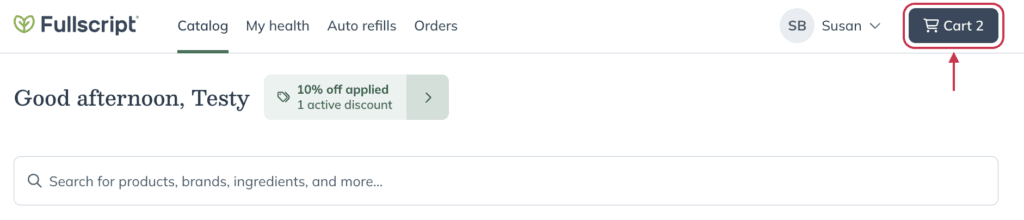
- Continue through the checkout process as normal, providing your shipping address and selecting your shipping method.
- On the payment information page, click +Add new payment method.
- Enter the email address tied to your Stripe Link account in the Email field.
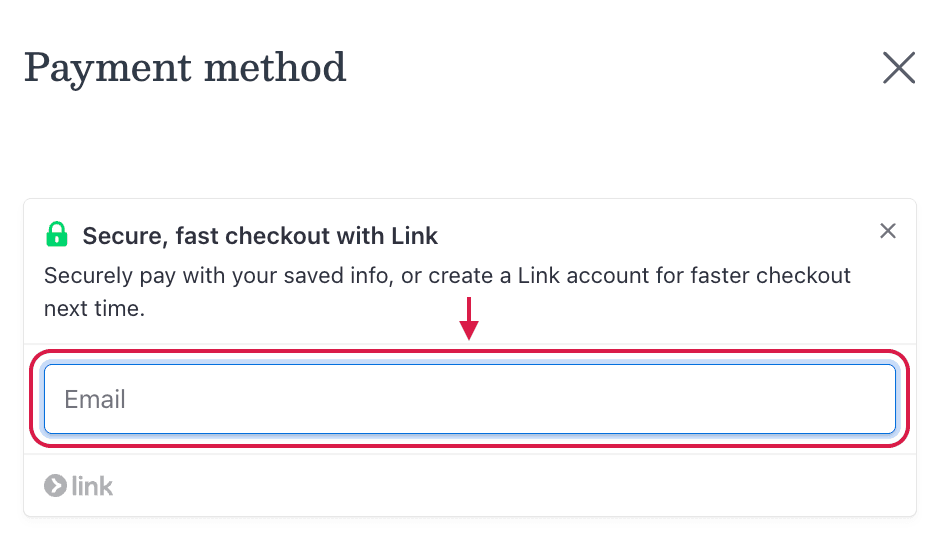
- You’ll be prompted to verify your account using a code sent to you via SMS.
- After you input your code, Stripe Link will securely fill in your saved payment information at checkout—for this order and those going forward.
Payment installments (Klarna)
Split up the cost of your orders using flexible payment installments, so you don’t have to choose between your wellness and your wallet. Select the Klarna payment option in checkout to pay in installments.
Klarna offers flexible payment options like Pay in 4 (four interest-free payments made every two weeks) and Pay Later (pay the full amount later, usually within 30 days). The options available depend on your region and order total, and are shown during checkout if your order qualifies.
To pay with Klarna at checkout:
- Add products to your cart and proceed to checkout.
- At the payment step under Payment information, select the Klarna payment option.
- Select Checkout with Klarna.
- You’ll be redirected to Klarna’s secure website to:
- Log in (if you already have a Klarna account), or;
- Create a free Klarna account (this only takes a few minutes).
- Select your payment plan and return to Fullscript to complete your purchase.
Klarna isn’t available when your cart includes Auto-refill items. To use Klarna, switch to a one-time order at checkout.
In the U.S., Pay in 4 is available for orders from $1–$2,000 USD, and Pay Later for $5–$1,000 USD. In Canada, Pay in 4 is available from $1–$1,500 CAD, and Financing starts at $250 CAD. This installment payment option is not currently available for autoship or practitioner-paid orders.
For questions about your payment plan, late fees, or account status, please reach out to Klarna directly.
Paying for labs
Lab testing is simple with Fullscript—you can order and pay for tests using the same login you use for supplements.
Providers have two billing options when recommending a test:
- Your provider pays upfront and bills you directly.
- You pay through your Fullscript account.
- Paying for labs as a patient is similar to the process of placing a supplement order.
Fullscript doesn’t determine HSA/FSA eligibility for lab tests. Patients should check with their plan administrator to confirm HSA/FSA coverage.
Insurance coverage options
For Health Savings Accounts (HSA), Flexible Spending Accounts (FSA) and other insurance information, see Insurance coverage.
Your saved payment methods
When you register for auto refill, you expressly acknowledge and agree that your provider is automatically authorized to charge you for orders according to your chosen delivery schedule until you cancel. Read more about our Auto refill Terms and Conditions.
Order cancellations and charge transfers
We’re unable to support order cancellations or charge transfers from one method of payment to another. If you need to return items from your order for a refund, please start a return request.
The entire unopened package must be shipped back before you can place a new order and charge it to a different payment method.
Some charges labeled as “recurring” on bank statements
Some charges may be labeled as “recurring” on your bank statement. Our payment processor, Stripe, explains that the “recurring” designation is necessary to save your payment information for future purchases. This can occur for charges related or unrelated to an auto refill subscription.
Stripe, in compliance with the Payment Card Industry Data Security Standard, doesn’t store CVC codes on its servers. The “recurring” flag lets your bank know that this information wasn’t stored and increases the likelihood that your bank will approve charges incurred for future orders. Please visit Stripe’s website for more information.