
On Fullscript, you can assign a signing practitioner to authorize lab orders on behalf of your practice.
Practitioners with limited ordering access can still recommend testing by using the authorization network, or you can route orders through your internal signing practitioner. You’ll have the flexibility to choose your preferred workflow for each lab order.
Before you designate a signing practitioner for your practice:
- Invite other practitioners on your team — including your signing practitioner — to join your Fullscript account.
- Make sure you’re registered for labs by verifying your credentials and accepting the terms of service.
Ordering access
Whether you use a signing practitioner or the authorization network to order lab tests depends on your ordering access. Ordering access is set by each lab company based on your license, state, and NPI number.
- Authorized practitioners are able to order any test from our catalog.
- Practitioners with limited ordering access can only recommend testing from a limited test menu through the authorization network.
Designating a signing practitioner
The account owner can assign a signing practitioner from Labs settings by following these steps:
Before assigning a signing practitioner, make sure they’ve been invited to your Fullscript account and completed the labs registration process. If they haven’t registered yet, you’ll see Not registered next to their name.
- Click Labs in the left-hand navigation.
- Select Labs settings.

- Click Ordering access.
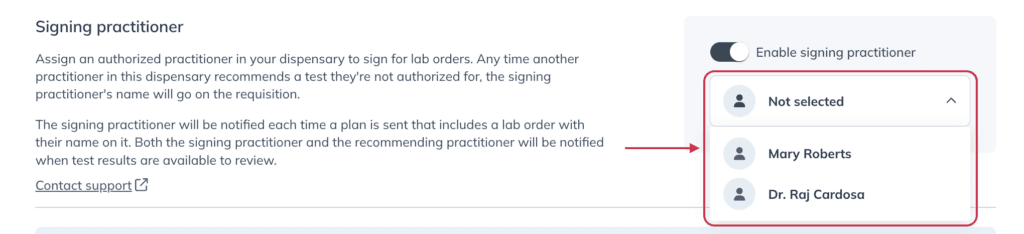
- Turn on the Enable signing practitioner toggle.
- Select a practitioner from the dropdown.
Medical Doctors (MD), Chiropractors (DC), Osteopathic Doctors (DO), Podiatrists (DPM), and Dentists (DDS) have full ordering access based on the labs we currently support. These practitioners are eligible to act as signing practitioners for team members without ordering access.
Placing an order using a signing practitioner
Once a signing practitioner is assigned to your account, any team members with limited ordering access can place lab orders under that practitioner’s license and supervision.
Follow these steps to successfully place an order using a signing practitioner:
- Complete labs registration. During registration, you’ll be prompted to join the authorization network but you can choose your team’s signing practitioner when it’s time to order.
- Create a lab recommendation. Once you’re registered for labs, add testing to the patient’s plan.
- Choose the signing practitioner. The drop down list on the review page will show your signing practitioner as well as Fullscript’s authorization network.

Choosing the signing practitioner or the authorization network for a plan from the Review plan tool.
When using a signing practitioner, the patient will still see the plan writer as the ordering practitioner on their plan.

The recommending practitioner for the patient’s plan.