
Fullscript’s lab ordering access is designed to closely align with Rupa’s model to minimize disruption during your transition. If you previously used Rupa’s Physician Services, Fullscript offers a similar option through the authorization network. This allows you to continue recommending lab testing through a licensed signing clinician when needed.
Lab ordering access is determined by each lab company based on your state, license, and NPI number.
Your practice will only be eligible to move once the lab companies, features, and any EHR integrations you use on Rupa are available on Fullscript. When you move, all Rupa account data—order history, client list, favorites, custom panels, bundles, preferred phlebotomists, and text snippets—will be transferred seamlessly.
We’ll send you an email and add a notification to your Rupa account dashboard two weeks (14 days) before you become eligible to move to Fullscript. Once eligible, you’ll have 14 days to complete your move. Until then, continue ordering and managing labs on Rupa until it’s your time to move! Learn more.
Signing practitioners
On Fullscript, you can assign a signing practitioner from your team to authorize lab orders on behalf of your practice. After registering for labs, account owners with limited ordering access can continue to recommend testing through the signing practitioner.
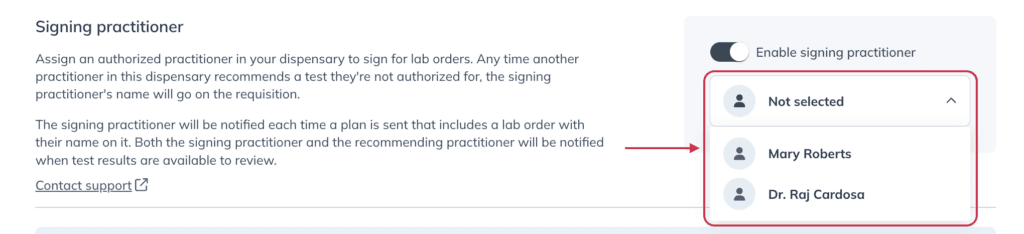
Selecting a signing practitioner for your practice.
The authorization network
The authorization network helps practitioners with limited ordering access recommend lab testing while staying connected to patient care.
If you don’t have a signing practitioner on your team with broader ordering access, you can opt in to recommend tests from a curated list. Each recommendation is reviewed and ordered by a licensed clinician—similar to Rupa’s Physician Services—so you can remain within your scope while still offering lab testing.
If you previously relied on Physician Services on Rupa, the authorization network provides the same core functionality. The signing clinician will appear on the lab requisition form, but you remain the recommending provider within Fullscript.
If you previously used Physician Services on Rupa, you’ll see the option to opt in to the authorization network when you move your account from Rupa to Fullscript. This quick step ensures you can continue recommending tests through a signing clinician without needing to complete a separate setup.
Authorization network fee
A $9.50 authorization network fee applies per test or panel when an order requires review by a signing clinician. You can choose whether the patient pays this fee at checkout or your practice covers it and bills separately.
If you’re moving from Rupa, you may recognize a similar fee from Rupa’s Physician Services. While the per-test fee structure differs slightly, the overall cost is often lower on Fullscript. Fullscript applies only a 3% service fee on specialty labs, while Rupa applied a 7% service fee on the entire order total.

The Authorization network fee in a patient’s cart before checkout.
If the authorizing clinician doesn’t approve the order, the patient will be refunded for both the test and the $9.50 authorization network fee. You’ll also be notified of the decision.
Lab results and patient notifications
If you previously used Rupa’s Physician Services, you may notice a difference in how patients are notified when results are ready.
- On Rupa, patients were automatically notified as soon as results became available.
- On Fullscript, both you and your patient have access to results at the same time, but you decide when the patient is notified. This allows you to review results first, add context, and choose when to share them with your patient.
Support and resources
We’re here to support your transition and ongoing success with labs on Fullscript. To help you get the most out of your labs experience on Fullscript, explore some helpful resources from the Fullscript support center:
Labs catalog overview: Explore the different types of lab tests available on Fullscript—what they offer, when to use them, and how they can enhance patient outcomes.
Labs billing and payment: Flexible billing options for labs, allowing you to choose the method that best fits your practice’s workflow.
Clinical consultations: These one-on-one consultations, offered by our specialty labs partners, are designed to provide educational support and clinical guidance.
Staff: Ordering and managing labs: Staff members can help their team manage lab testing workflows in Fullscript—from adding lab tests to plans to tracking results.
Tracking patient testing status: You can follow your patient’s progress through every step of the testing process, from kit shipment to final results, using the Testing status indicators in the labs dashboard.
Specimen issues: Learn how to identify, manage, and resolve specimen issues that may affect a patient’s lab order in Fullscript.