
As Rupa providers transition to labs on Fullscript, there are a few key differences in how custom fees and payouts are handled. If you’ve been using Stripe Express to receive custom fee payouts through Rupa, you’ll continue to have access to your existing Stripe account, but you won’t need to create or manage a new one for Fullscript.
In this article, we’ll walk you through what’s changing, what’s staying the same, and how to manage your Stripe accounts going forward.
Custom fee settings won’t carry over automatically. When you move to Fullscript, you’ll need to first enable custom fees then set the fee name and amount. Don’t worry—this step is built right into your Fullscript account setup to make things easy. After setup, custom fees can be enabled and customized from Labs settings in Dispensary settings. For more information, see Labs billing & payment: Custom fees.
Your practice will only be eligible to move once the lab companies, features and any EHR integrations you use on Rupa are available on Fullscript. When you move, all Rupa account data—order history, client list, favorites, custom panels, bundles, preferred phlebotomists, and text snippets—will be transferred seamlessly.
We’ll send you an email and add a notification to your Rupa account dashboard two weeks (14 days) before you become eligible to move to Fullscript. Once eligible, you’ll have 14 days to complete your move. Until then, continue ordering and managing labs on Rupa until it’s your time to move! Learn more.
Custom fees on Rupa vs Fullscript
What’s staying the same:
- You can still charge custom fees for your services. Whether it’s for interpretations or consultations, you’ll retain the ability to add custom, itemized fees for your services.
- You decide the default fee name and amount of custom fees to suit your practice. You can edit the fee name and amount for each individual patient before you send their testing.
- You and your patients will see an itemized fee. On both platforms, practitioners and patients see the cost of testing separate from custom fees related to lab services.
- You’ll continue receiving payouts to your bank account. Even though the backend system changes, your payouts still arrive in your practice’s bank account and there’s no action needed from you beyond your initial account setup.
- You can track custom fees in payout reports. On Fullscript, custom fees are set as a separate line item in your payout reports, just like Rupa did through Stripe.
- Historical Rupa payout information is still accessible. You retain view-only access to your Rupa Stripe Express account and dashboard for referencing past orders, tax forms, and payments.
What’s changing:
- You’ll choose your custom fee name from a list of popular options. This includes names like: “Interpretation fee” and “Consultation fee.”
- Custom fees are applied per test, not per order. On Rupa, the fee was applied once per order. On Fullscript, custom fees are tied to individual tests or blood panels for greater billing flexibility.
- Proceeds from custom fees are added to payouts earlier in the ordering process. Custom fees are added as eligible payout earnings once a Quest requisition is created or a specialty kit ships. On Rupa, payouts were made after results were delivered.
- You’ll no longer manage a Stripe Express account—learn more.
Custom fee payouts on Fullscript
Like Rupa, Fullscript allows you to add custom, itemized fees to lab orders to account for additional services like test interpretations and consultations. But unlike Rupa, you won’t manage a Stripe account yourself.
Instead, custom fees are included directly in the patient’s lab order total and payouts for these fees are delivered as part of your regular Fullscript earnings—no extra invoicing or third-party platform required.
Payout timing
Your payout schedule can be confirmed in your payout report. Custom fees are added to your next payout as available earnings, then consolidated and deposited as a single payout on your next payout date. By default, payouts are deposited every 30 days.
Here’s what you should know about custom fee payout timing:
- For blood labs, custom fees are added to payouts when the requisition is generated.
- For specialty labs, custom fees are added to payouts when the kit ships.
Learn more about custom fee funds and how they’re added to your payouts.
Using Stripe with Fullscript
With Fullscript, you won’t need to set up or log into Stripe. While Fullscript uses Stripe behind the scenes to manage payouts securely, the experience is entirely handled for you.
- No Stripe Express login or onboarding is required.
- You won’t be prompted for identity verification or tax info from Stripe separately. All verifications will appear within Fullscript going forward, if required anytime after setting up your Fullscript account.
- All earnings—including custom fees—are tracked in your Fullscript account and reflected in your payout reports.
Managing your Rupa Stripe Express account
When you move to Fullscript and your Rupa account transitions to view-only, you’ll continue to have access to the Stripe Express account that was used for Rupa custom fee payouts, but you cannot use your existing Rupa Stripe account for Fullscript. Each platform uses a separate Stripe instance, and Rupa-connected accounts are not transferable.
Your Stripe Express account will remain active in a view-only state, allowing you to:
- Review past payouts from Rupa orders.
- Access your Stripe dashboard directly from your Rupa settings.
- Download tax forms or update account details (if prompted by Stripe).
To get there, log into your Rupa account and navigate to Settings > Billing & Custom Fees > Manage payouts. You can also go to the Stripe Express login page directly. Click here to learn more about logging in.
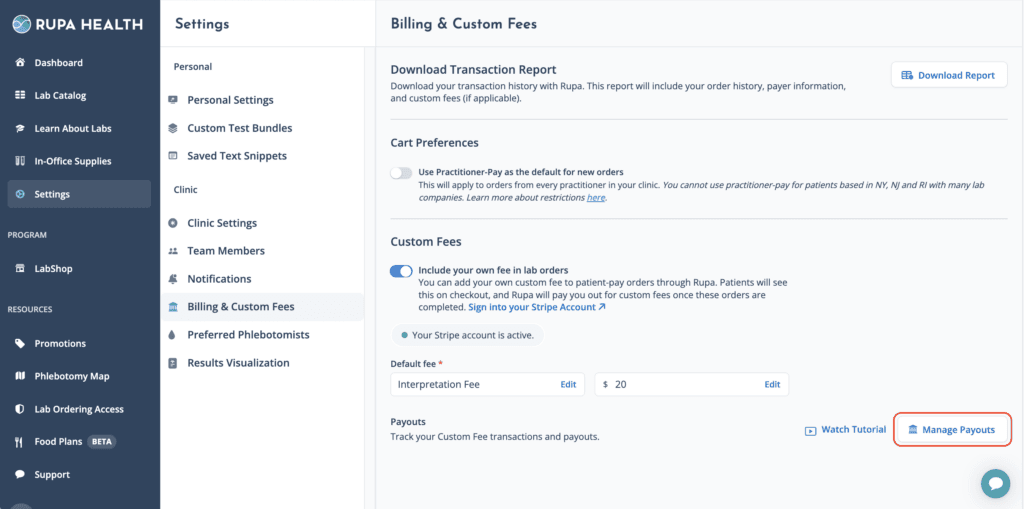
Stripe Express access link in your Rupa Billing & Custom Fees settings.
In some cases, Stripe may request identity verification before releasing funds from older Rupa orders. If that happens, follow the instructions in your Stripe dashboard. These requests are unrelated to Fullscript and won’t affect your Fullscript payouts.
Managing two Stripe accounts
You won’t need to actively manage two Stripe accounts, but here’s what to keep in mind:
- All orders paid for on Rupa flow to your Rupa Stripe account.
- Stripe may still contact you regarding your Rupa account for identity or tax verification.
- It’s recommended to keep your Rupa account information up to date in case of tax filings or future support requests.
- All new lab-related earnings will come through Fullscript—there’s nothing you need to do in Stripe to receive them.
Account | Purpose | Access? |
Rupa Stripe Express | Past custom fee payouts from Rupa orders | Yes, view-only via Rupa. |
Fullscript | Current and future custom fee payouts from Fullscript | No access, managed by Fullscript. |